Low Microsoft Copilot adoption is rarely a technology problem. It usually comes from three gaps: employees do not know where Copilot fits in their daily work, data governance concerns slow the rollout, and there is no ongoing support after launch. The fix is role-based training on real tasks, cleaned-up data permissions, and a structured adoption plan with champions and measurement.
Many organizations licensed Microsoft 365 Copilot expecting immediate productivity gains. Months later, usage dashboards tell a different story: a burst of activity at launch, followed by a steady decline. If that sounds familiar, you are not alone.
The adoption gap is widespread
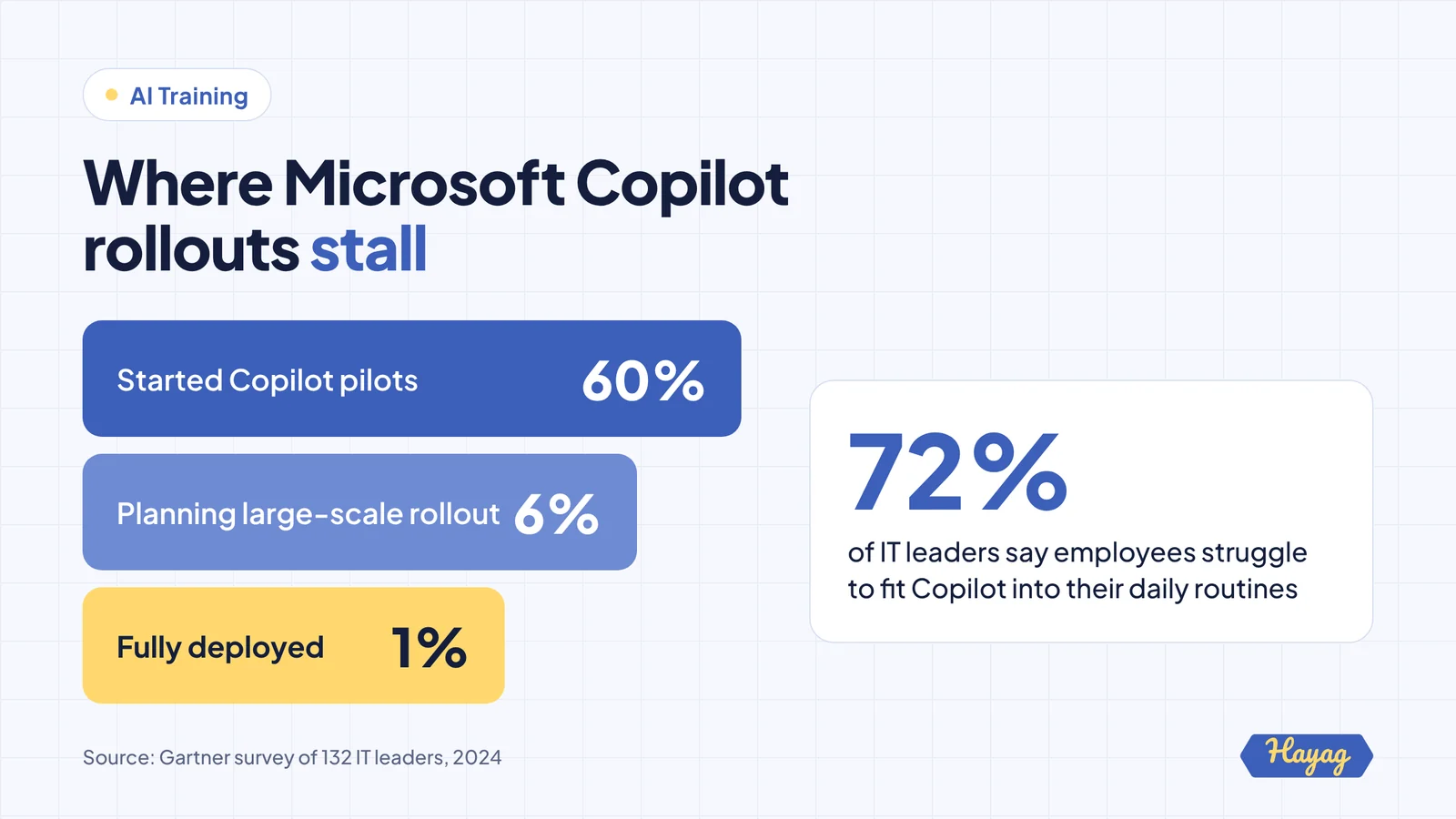
A 2024 Gartner survey of 132 IT leaders found that 60% had started Copilot pilots, but only 6% had finished their pilots and were planning large-scale deployment. Just 1% had rolled Copilot out to all eligible office workers.
The same survey highlights the human side of the problem:
- 72% said employees struggled to fit Copilot into their daily routines.
- 57% saw engagement drop quickly after rollout.
- 73% found change management needs were higher than expected.
- 87% said users need frequent engagement and education.
Employees were not resistant. In the same survey, 98% of IT leaders said employees were excited to use Copilot. The enthusiasm was there. The habits were not.
Five reasons Copilot adoption stalls
1. People do not know what to use it for
A blank prompt box is intimidating. Without specific examples tied to their job, most employees try a few generic requests, get average results and return to their old way of working.
2. Training focused on features, not tasks
Many rollouts include a product demo or a link to vendor videos. That explains what Copilot can do in general, not how a finance analyst or HR manager should use it on Monday morning.
3. Data governance concerns slowed or narrowed the rollout
Copilot can surface any content a user has permission to see. In the Gartner survey, 40% of organizations delayed rollouts by three months or more because of concerns about oversharing, and 57% limited access to low-risk users. When the people with the most to gain do not have access, adoption stays low.
4. No support after launch
Habits form over weeks, not hours. When training ends at launch day, there is nobody to answer questions, share tips or encourage people who got poor results on their first attempts.
5. No clear measures of success
If the only metric is license utilization, it is hard to know which teams are getting value, which use cases work and where to focus support.
How to fix low Copilot adoption: a six-step plan
Step 1: Clean up permissions first
Work with IT to review sharing settings, sensitivity labels and access to high-risk sites before expanding access. This removes the main reason rollouts get delayed or restricted, and gives leaders confidence to extend Copilot to the teams that need it most.
Step 2: Identify high-value tasks by role
Interview team leads and find the three to five tasks per role where Copilot saves the most time. Typical examples include summarizing long email threads, preparing meeting recaps, drafting documents from notes, analyzing spreadsheets and creating first-draft presentations.
Step 3: Run role-based, hands-on training
Replace generic demos with short, practical sessions built around those tasks. Each participant should complete real work during the session and leave with a set of tested prompts for their role. Live online sessions work well and allow teams in different regions to take part.
Step 4: Give people a prompt library and quick reference
Create a shared library of prompts that work, organized by function and task. Add a one-page guide covering what to use Copilot for, what to check before sharing outputs, and what information should not be used.
Step 5: Appoint Copilot champions
Select one champion per team. Give them deeper training, a monthly check-in and a simple way to collect and share use cases. Champions are the single most effective way to keep adoption growing after launch.
Step 6: Measure adoption and value
Track a small set of measures monthly:
| Measure | What it tells you |
|---|---|
| Weekly active users by team | Where adoption is strong or weak |
| Use cases documented | Whether people are building repeatable habits |
| Time saved on target tasks | Whether Copilot creates real value |
| User confidence ratings | Where more training is needed |
Share results with leadership and use them to decide where to expand next.
A 60-day Copilot relaunch plan
If your rollout has already stalled, you can restart it:
| Weeks | Action |
|---|---|
| 1 to 2 | Review usage data, interview teams, fix key permission issues |
| 3 to 4 | Build role-based use cases and prompt libraries |
| 5 to 6 | Run hands-on training by function, launch champions |
| 7 to 8 | Measure, share early wins and plan the next wave |
Key takeaways
- Low Copilot adoption is a habit, training and governance issue, not a product failure.
- Fix data permissions early so the right people get access.
- Train by role and task, not by feature.
- Support adoption for weeks after launch with prompt libraries and champions.
- Measure active use and time saved, not just licenses assigned.