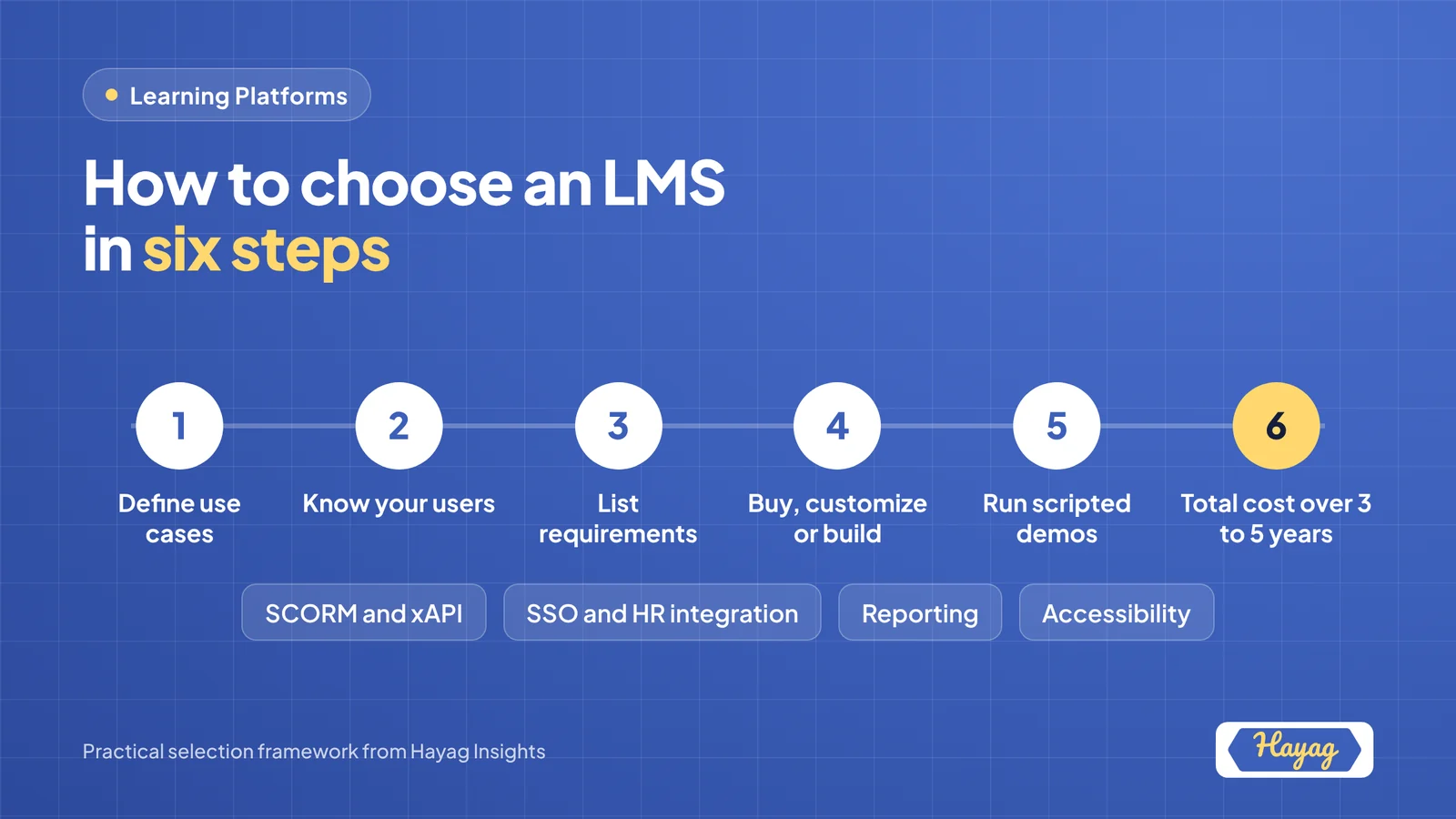
To choose the right learning management system, start with your learners and use cases, not product features. Define who will use it, what content it must deliver, which systems it must connect to and how you will measure results. Then compare off-the-shelf platforms against a customized or custom-built option, run scripted demos with real scenarios, and check total cost over three to five years before signing.
An LMS is a long-term decision. Switching platforms means migrating content, users and records, so choosing well the first time saves money and disruption. This checklist helps you define requirements and compare options with confidence.
Why LMS selection matters more than ever
Learning teams are under pressure to show value with less time. ATD reports that formal learning hours per employee fell from 17.4 to 13.7, while organizations spend an average of $1,054 per employee on direct learning. When learning time is scarce, the platform has to make learning easy to find, quick to complete and simple to measure.
Step 1: Define your use cases
Different organizations need very different platforms. Start by naming your main use cases:
| Use case | What it usually needs |
|---|---|
| Employee onboarding | Learning paths, automated enrollment, manager visibility |
| Compliance training | Assignments, deadlines, reminders, audit-ready reports |
| Skills development | Skills tagging, recommendations, content libraries |
| Customer or partner training | External access, branding, ecommerce or licensing |
| Schools and universities | Courses, grading, cohorts, student information system links |
| Selling courses | Payments, storefront, subscriptions, marketing tools |
Most organizations have two or three primary use cases. These should drive every later decision.
Step 2: Know your users
- How many learners now, and in three years?
- Are learners internal, external or both?
- Which devices do they use: desktop, mobile or both?
- Which languages and regions must you support?
- Who administers the platform, and how technical are they?
Step 3: The LMS requirements checklist
Use this checklist to build your requirements. Mark each item as essential, important or nice to have.
Learning experience
- Clean, intuitive learner interface
- Mobile-friendly or native mobile app
- Search and personalized recommendations
- Learning paths and certifications
- Support for video, documents, quizzes and live sessions
- Social or discussion features
Content and standards
- SCORM support (1.2 and 2004)
- xAPI support for richer tracking
- Ability to build simple courses inside the platform
- Integration with content libraries
- Multilingual content support
Administration
- Bulk user management and automated enrollment rules
- Groups, roles and permissions
- Notifications and reminders
- Easy course setup without technical help
Reporting and analytics
- Completion, progress and assessment reports
- Manager dashboards
- Custom reports and scheduled exports
- Audit trails for compliance
Integrations
- Single sign-on (SSO) with your identity provider
- HR system integration for user data
- Video conferencing tools for live sessions
- CRM or ecommerce systems, if training customers
- Open API for future integrations
Security and compliance
- Data encryption and secure hosting
- Compliance with relevant data protection regulations, such as GDPR
- Data residency options, if required in your region
- Accessibility support aligned with WCAG
AI capabilities
- AI-assisted content creation or translation
- Personalized learning recommendations
- AI tutors or assistants
- Clear policies on how learner data is used by AI features
Vendor and support
- Responsive support across your time zones
- Clear product roadmap
- Implementation and migration support
- Transparent pricing model
Step 4: Off-the-shelf, customized or custom-built?
There are three broad routes:
| Option | Examples | Best for | Trade-offs |
|---|---|---|---|
| Off-the-shelf SaaS | Docebo, TalentLMS, LearnUpon | Standard corporate training, fast launch | Limited flexibility, ongoing per-user fees |
| Open-source or plugin-based, customized | Moodle, Canvas, LearnDash | Education, cost control, more flexibility | Needs technical setup and maintenance |
| Custom-built | Built for your needs | Unique workflows, branded learner experience, selling learning products | Higher upfront investment, longer build time |
Off-the-shelf platforms suit most standard needs. Customization or a custom build makes sense when you have unique workflows, need deep integration with your own systems, want full control over the learner experience, or are building a learning product to sell.
Step 5: Run scripted demos
Do not let vendors show only their best features. Give each vendor the same real scenarios and ask them to walk through them live:
- Enroll a new employee automatically from your HR system
- Assign a compliance course with a deadline and reminders
- Show a manager what their team has completed
- Upload a SCORM course and show the tracking data
- Complete a course on a mobile phone
- Produce an audit-ready compliance report
Score each vendor against your requirements, and include administrators and learners in the evaluation.
Step 6: Calculate total cost of ownership
The license fee is only part of the cost. Over three to five years, include:
- Licensing or subscription fees
- Implementation and setup
- Content migration
- Integrations and customization
- Hosting and maintenance, for open-source or custom options
- Administration time
- Training for administrators
A platform with a lower license fee can cost more over time if it needs heavy customization or administration.
Common LMS selection mistakes
- Choosing on features, not use cases. The longest feature list rarely means the best fit.
- Ignoring the learner experience. If learners find it hard to use, adoption suffers.
- Overlooking integrations. Manual data transfers create work and errors.
- Underestimating migration. Moving content and records takes planning and time.
- Skipping the admin view. Administrators use the platform every day; their experience matters.
- Not planning for growth. Check pricing and performance at your future scale.
Key takeaways
- Start with use cases and learners, not product features.
- Build a prioritized requirements checklist covering experience, standards, reporting, integrations, security and AI.
- Compare off-the-shelf, customized open-source and custom-built options honestly.
- Run scripted demos using your real scenarios.
- Calculate total cost of ownership over three to five years.