When outsourcing eLearning development, choose a partner with strong instructional design, relevant samples, a clear process, compatible tools and standards, and transparent pricing. Ask how they handle reviews, accessibility and updates, and start with a small pilot module before committing to a large program. The right partner improves quality and speed; the wrong one creates rework.
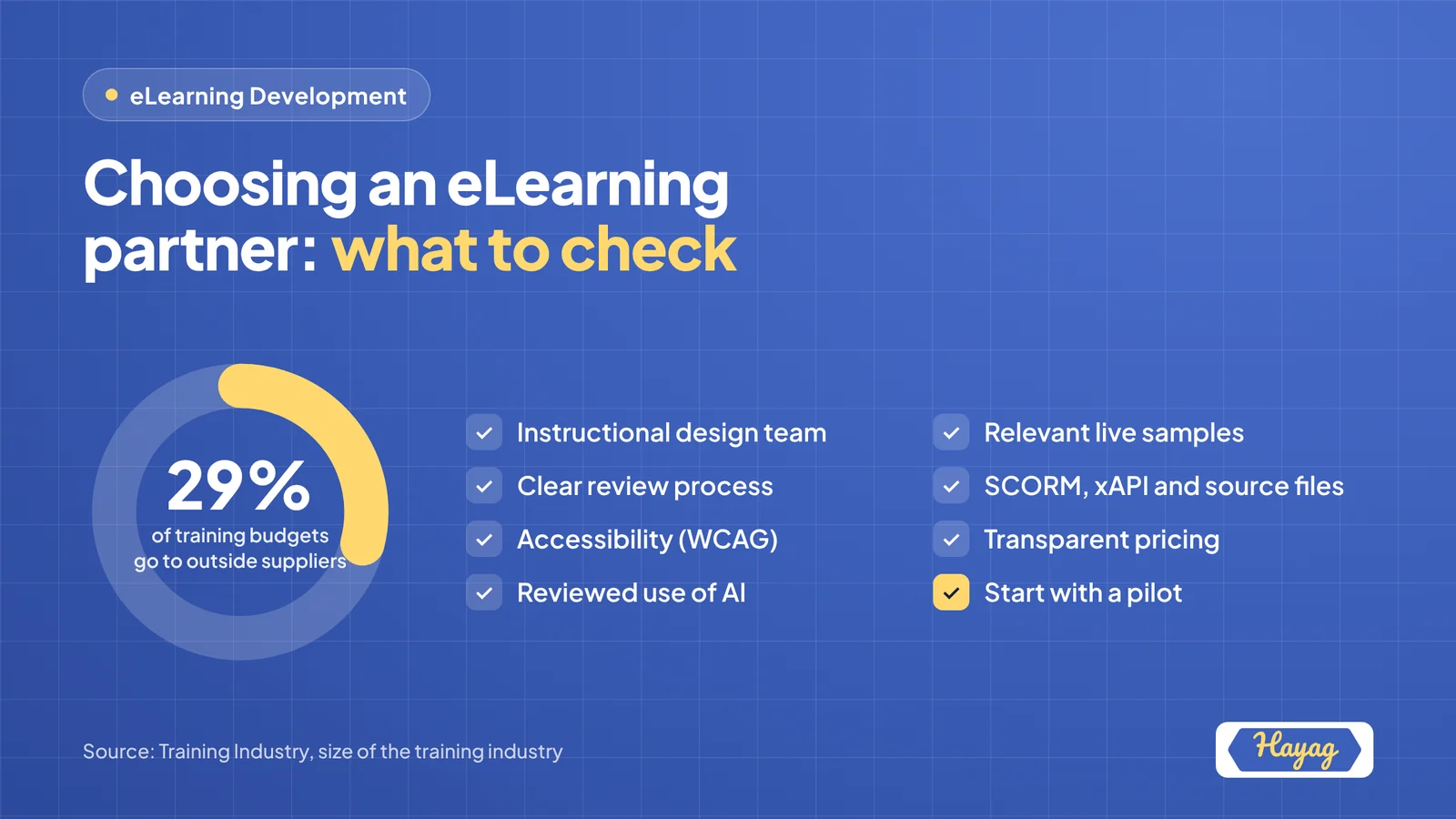
Outsourcing is common in corporate learning. Training Industry estimates that organizations spend around 29% of their training budgets on external suppliers. Done well, outsourcing gives you specialist skills and extra capacity without growing your team.
When outsourcing makes sense
Outsourcing is usually the right choice when:
- Your team has more content requests than capacity
- You need specialist skills, such as scenario design, animation or localization
- You have a fixed deadline, such as a product launch or compliance date
- You want to refresh a large library of outdated courses
- You need content in several languages or for several regions
Keep strategy, priorities and final approval in-house. Outsource design and production.
The partner checklist
1. Instructional design expertise
- Do they have dedicated instructional designers, not just developers?
- Can they explain how they set learning objectives and design assessments?
- Do they ask about your learners and business goals before discussing tools?
This is the most important factor. Good design is what makes training effective; development makes it look good.
2. Relevant samples
- Can they show work similar to what you need, such as scenario-based, compliance, software or soft skills training?
- Do samples show a range of interactivity levels?
- Is the writing clear and suitable for your audience?
Ask to click through live samples rather than watching a showreel.
3. A clear, documented process
- Do they follow defined stages, such as analysis, design, storyboard, development and testing?
- Are review points and sign-offs clearly scheduled?
- Do they limit or define the number of revision rounds?
4. Tools and standards
- Do they use authoring tools compatible with your team, so you can update content later?
- Can they deliver SCORM or xAPI packages that work in your LMS?
- Will you receive source files at the end of the project?
5. Accessibility
- Do they design to recognized accessibility standards such as WCAG?
- Do they test with keyboard navigation and screen readers?
6. Communication and time zones
- Is there a named project manager?
- How often will you receive updates?
- Do working hours overlap enough with yours for reviews and calls?
A partner in a different time zone can be an advantage: work continues while your team is offline, as long as communication is well organized.
7. Quality assurance
- Do they test functionality, content accuracy and LMS compatibility before delivery?
- Is there a checklist or QA process you can see?
8. Pricing and contracts
- Is pricing transparent, per project or per finished hour?
- What is included, and what counts as a change request?
- Who owns the intellectual property?
- Is post-launch support or maintenance available?
9. Data security and confidentiality
- Will they sign a confidentiality agreement?
- How do they store and handle your materials?
10. Use of AI
- Do they use AI to speed up production?
- If so, how do they review AI-generated content for accuracy and quality?
Responsible AI use can lower cost and shorten timelines, as long as qualified people review every output.
Ten questions to ask every vendor
- How do you understand our learners before designing anything?
- Can you walk us through a project similar to ours?
- What does your review process look like, and how many rounds are included?
- Which authoring tools do you use, and will we receive source files?
- How do you ensure accessibility?
- Who will be our day-to-day contact?
- How do you handle feedback from several stakeholders?
- How do you price projects, and what affects the cost?
- How do you use AI in your process?
- Can we start with a pilot module?
Red flags to watch for
- Leading with tools, not learners. If the conversation is all about software, design may be weak.
- No instructional designers on the team.
- Unclear revision limits, which often lead to disputes later.
- No source files, leaving you dependent on the vendor for every update.
- Prices far below the market without a clear explanation.
- Reluctance to share live samples.
Start with a pilot
Before committing to a large program, commission one module. A pilot shows you the partner's design quality, communication, review process and ability to meet deadlines, with limited risk.
Key takeaways
- Organizations commonly outsource a significant share of training work to specialists.
- Prioritize instructional design expertise, relevant samples and a clear process.
- Confirm standards, accessibility, source file ownership and pricing upfront.
- Ask how vendors use and review AI in production.
- Start with a pilot module before scaling up.